You don’t need to know exactly how a large language model (LLM) works to use one every day. But a rough picture of what’s going on inside helps, because a lot of prompting advice follows directly from this understanding.
How LLMs work
From if-then code to machine learning
Traditional software is predictable. A programmer writes the rules: if this happens, do that; if something else happens, do something else. You can get surprisingly far with rules alone. In early racing games, the cars flying past you felt pretty real, and a lot of that was just rules like these. And when something goes wrong, you can always open the code and read exactly what it will do.
The next big step was traditional machine learning. Here, nobody writes the rules. Instead, you take a labeled data set, let’s say thousands of pictures of cats and dogs, and you train a model on it. Then you give the model a new picture, and it tells you what it sees and how sure it is: 98% cat, 2% dog. You take the highest percentage prediction and you use it.
The model itself is a neural network loosely inspired by the human brain, which you can picture as millions of tiny connected dials. Training nudges each dial a little at a time until the answers come out right. Nobody can really tell you what any single dial does, and trying to work it out isn’t practical. What you do instead is watch the inputs and the outputs. If the outputs are wrong, you fix the training data and train again.
The good news is that once training is done, the same input gives you the same output. So you can’t see inside the model, but you can still count on it to behave the same way every time.
LLMs: text in, next word out
Large language models take the same idea and point it at text. Someone asked: what if the input is a piece of text, and the thing we predict is the next word?
So instead of two labels, cat and dog, the labels are every word the model knows, often around 100,000 of them. Strictly speaking they’re tokens, which are words and pieces of words (“unbelievable” might be split into “un”, “believ”, and “able”), but I’ll just say “words” to keep things simple.
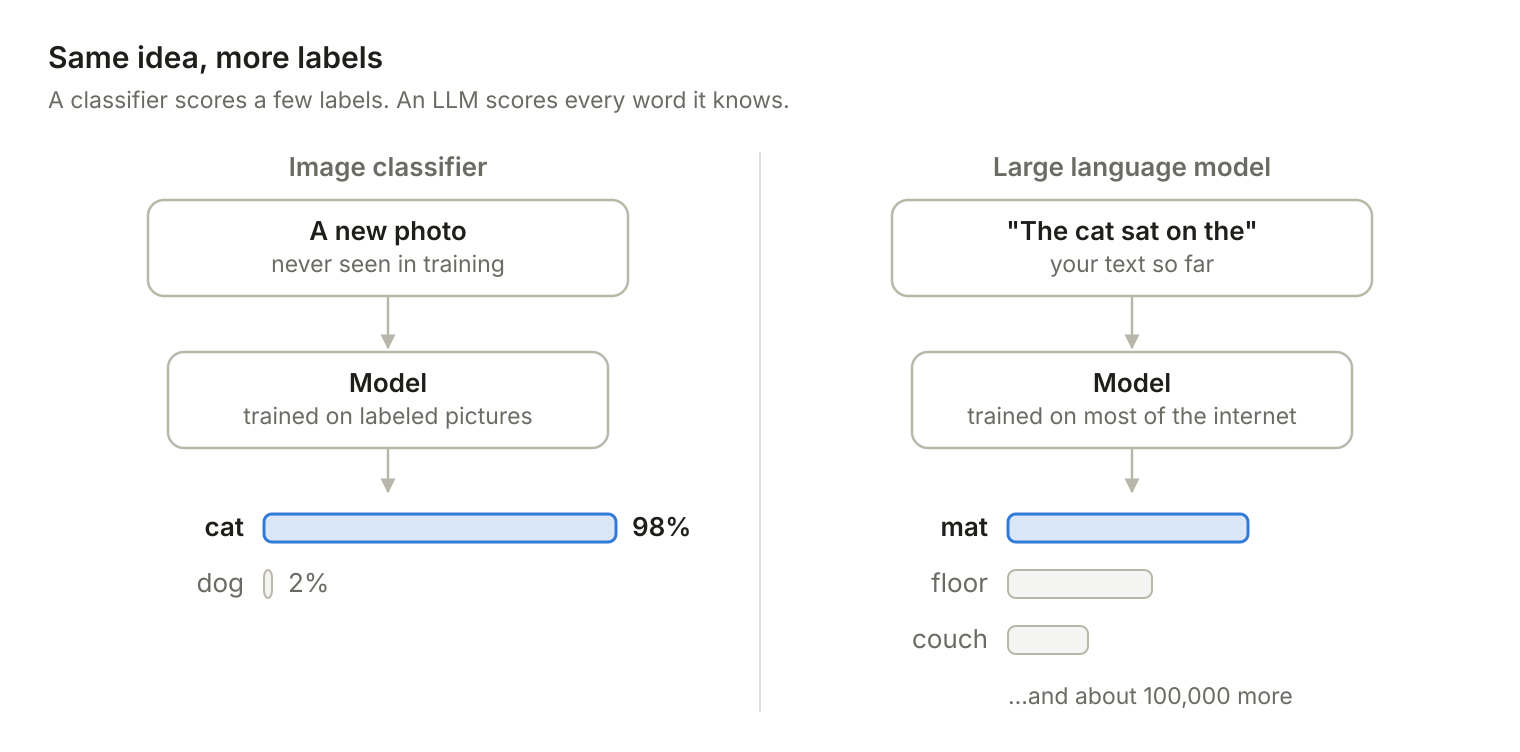
Nobody has to label this data by hand, because the next word in any piece of text is the label. Train a model like this on most of the internet, a step called pre-training, and you get something that is very, very good at predicting the next word.
That alone doesn’t give you a chatbot, though. A second round of training, called “post-training”, teaches it to follow instructions and use tools. It includes fine-tuning on examples of good conversations and reinforcement learning from human feedback (RLHF), where people rate the answers.
The loop is the whole trick
If you remember one thing from this post, make it this section.
You give the model some text. It comes back with a list of likely next words and a probability for each one. One of the top few gets picked, with a bit of randomness thrown in. That word is added to the end of your text, and the whole thing goes through the model again to get the word after that. Then again, and again, until the answer is finished. It’s your phone’s autocomplete, tapped over and over.
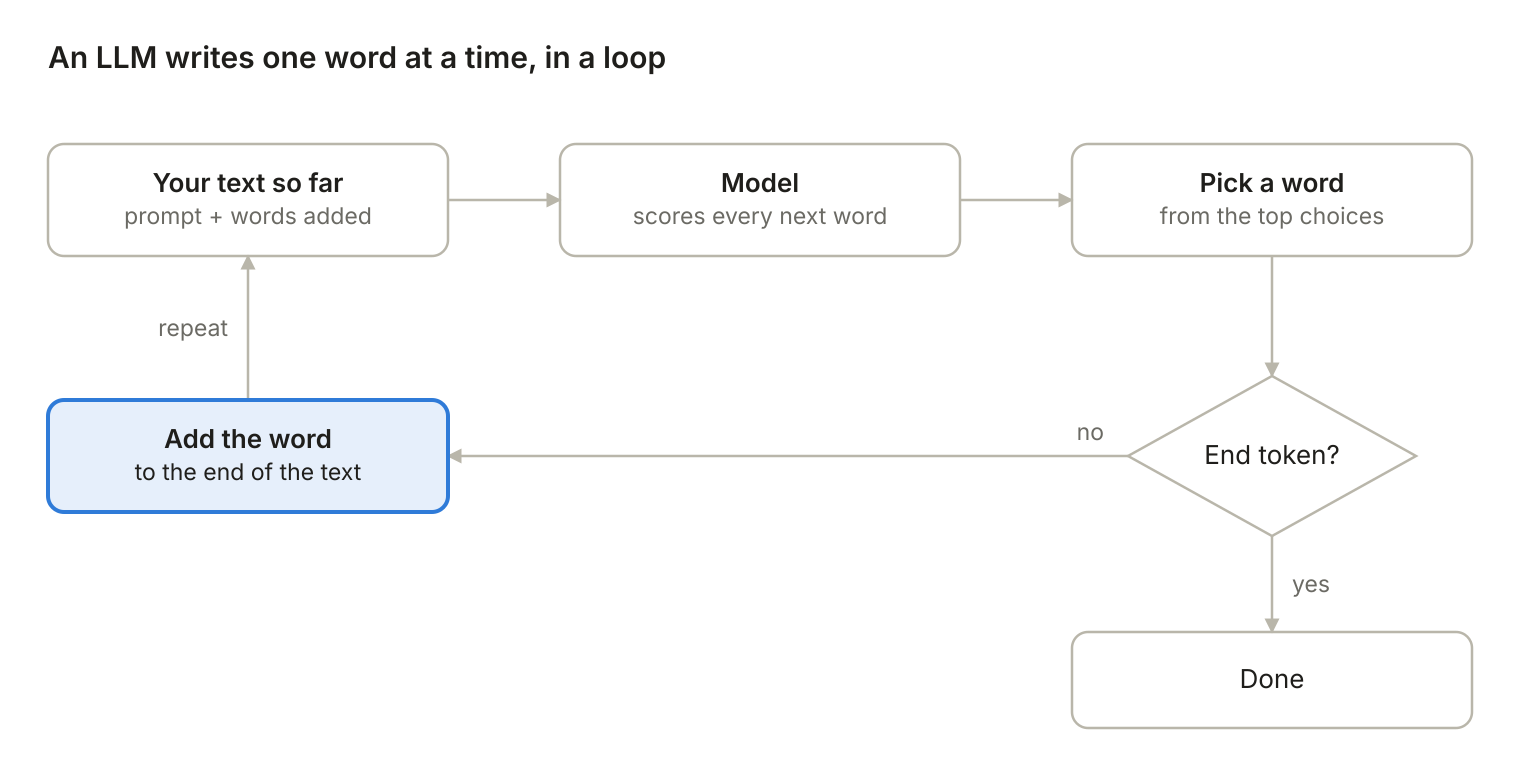
That really is all there is to it: text in, guess the next word, add it, repeat. It sounds too simple to work, but with a big enough model trained on enough text (hence Large in LLM) it does. Almost everything else in this post follows from that loop.
Output is the expensive part
Reading your text is fairly cheap for the model, because it takes in the whole thing at once. Writing the answer is the expensive part, because every new word needs another full pass through the model. It’s a bit like you and a page of text: you can take it in at a glance, but you can only write it one word at a time.
That’s why API pricing charges more for output tokens than for input tokens. If you’re on a subscription, which I think is the best way to use AI today, you mostly don’t have to think about this. If you’re paying per token through the API, the length of the output is your best lever for keeping the bill down.
LLMs have no memory
Most chat apps have a feature called “memory” now, but the model itself remembers nothing from one request to the next.
Here’s what actually happens when you send a message. The app takes your entire chat history, adds your new message to the end, and sends all of it to the AI provider. The model reads the whole thing from the top and runs the loop again.
The model has no idea the two of you have talked before. Every time, it’s seeing your chat for the first time, like a transcript someone just handed it. If the app stopped resending the history and you typed “make it shorter,” the model would have no idea what “it” is.
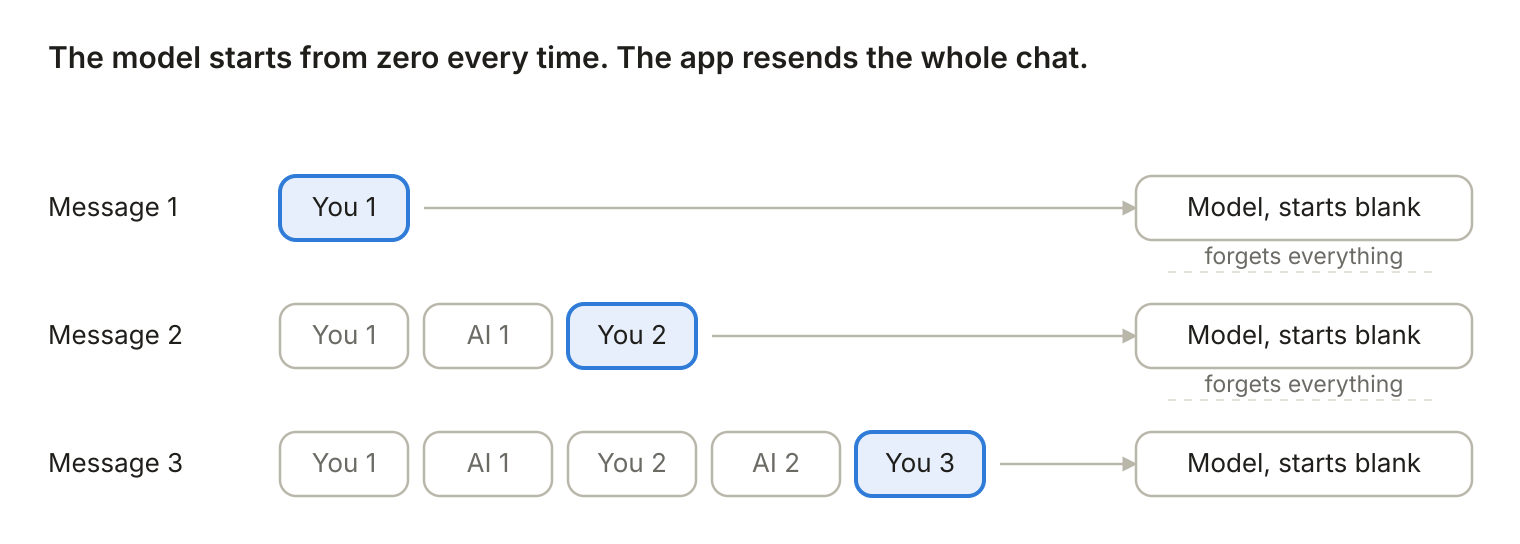
So what is the “memory” feature? It’s the same trick. The app saves notes and summaries from your past chats. When you send a new message, it picks the parts that look relevant and quietly adds them to the context, before your message. You never see this happen, so it feels like the model “remembers” you.
One catch: deleting a chat doesn’t always delete what the app already saved from it. If you want something gone, you need to delete it from memory too.
How it knows when to stop
Left alone, the model would keep predicting the next word forever, so something has to tell it to stop. That something is a special end token in the training text. The model learns to predict that token like any other word, and when it comes up, generation stops. There’s also a hard limit on how long an answer can be, which is why a very long answer sometimes cuts off in the middle.
Randomness is built in
The model doesn’t always pick the single most likely word. It picks from the top few candidates, and that’s on purpose. If it always took the top word, the answers would be duller and less useful, and sometimes the model would get stuck repeating itself.
Even if you turn that sampling off, you can still see small differences between runs. The reason is how GPUs work. They round numbers as they add them (floating point math), and the order of the additions can change depending on what else the server is processing at the same time.
You can see an example of this order-dependent rounding error in a JavaScript console.
console.log((0.1 + 0.2) + 0.3); // 0.6000000000000001
console.log(0.1 + (0.2 + 0.3)); // 0.6Code language: JavaScript (javascript)
Why it matters for your prompts
The model never starts anything on its own. It only responds to what you give it: what you ask, how you ask it, and in what order. That’s why prompting matters so much, and why it feels like part art and part science.
Keep context small and focused
The more irrelevant text you give the model, the more there is to distract it. A targeted question gets you a targeted answer. A big, noisy context makes it easier for the answer to drift off course.
Watch what your tools inject
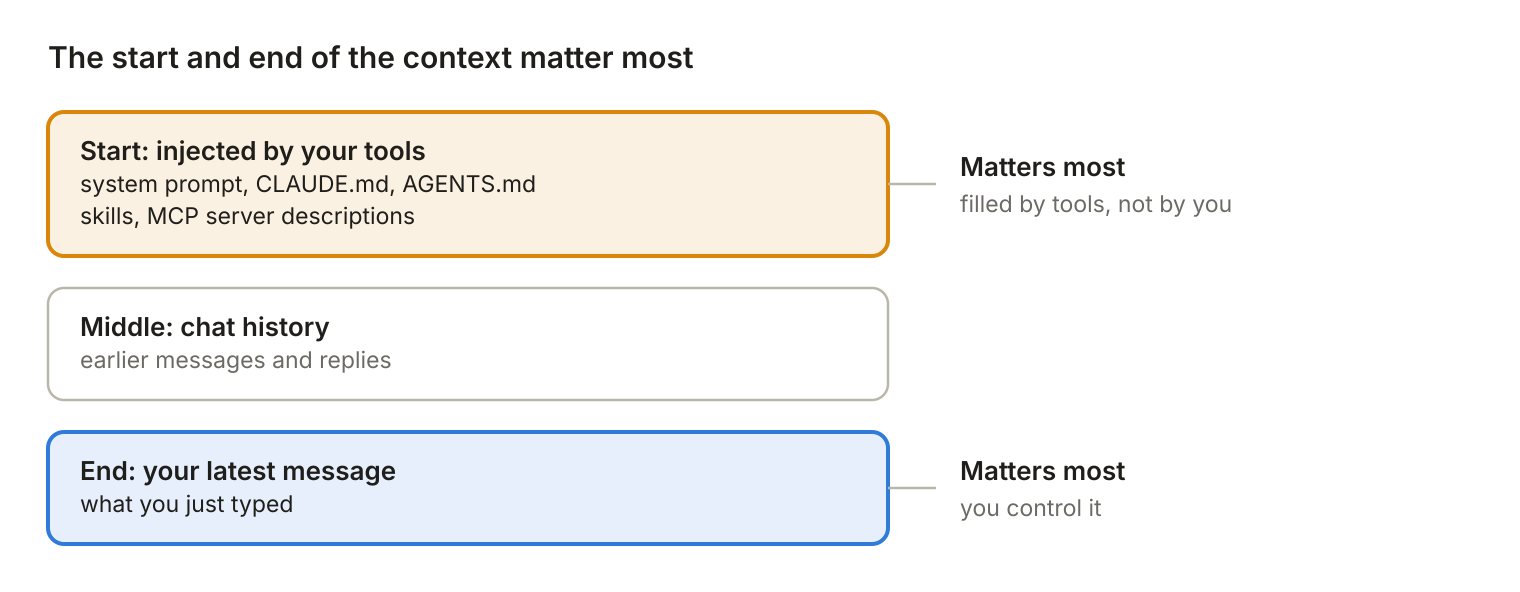
Tools like Claude Code and Codex add context before your message: CLAUDE.md, AGENTS.md, skills, MCP server descriptions.
That matters because the parts of the context that tend to count the most are the start and the end. Think of a long meeting: people remember how it started and the last thing that was said. Researchers call this problem “lost in the middle.”
The end is your latest message, so you control that. The start is where all of this injected text goes.
I often get much better results when I use LLMs without any extra context. With less noise in the context, the model stays focused on what I actually asked.
The point is not to avoid the context, though, but to be very careful and selective with what shows up there.
Give it facts, and let it use tools
Here’s the flip side: a model only knows what was in its training data. Ask it about the 2026 election, without letting it search the web, and it will either make something up or, in the best case, tell you it doesn’t know.
But give it the actual results, and it’s very good at analyzing them. So keep the context small, but make sure the facts the model needs are in it.
Models are also trained to use tools. So when you give a good model some data, it will often write a small program to analyze it, run the program, and give you the result instead of guessing.
If it tries to guesstimate the answer, ask it to write code instead.
Ask for the reasoning before the answer
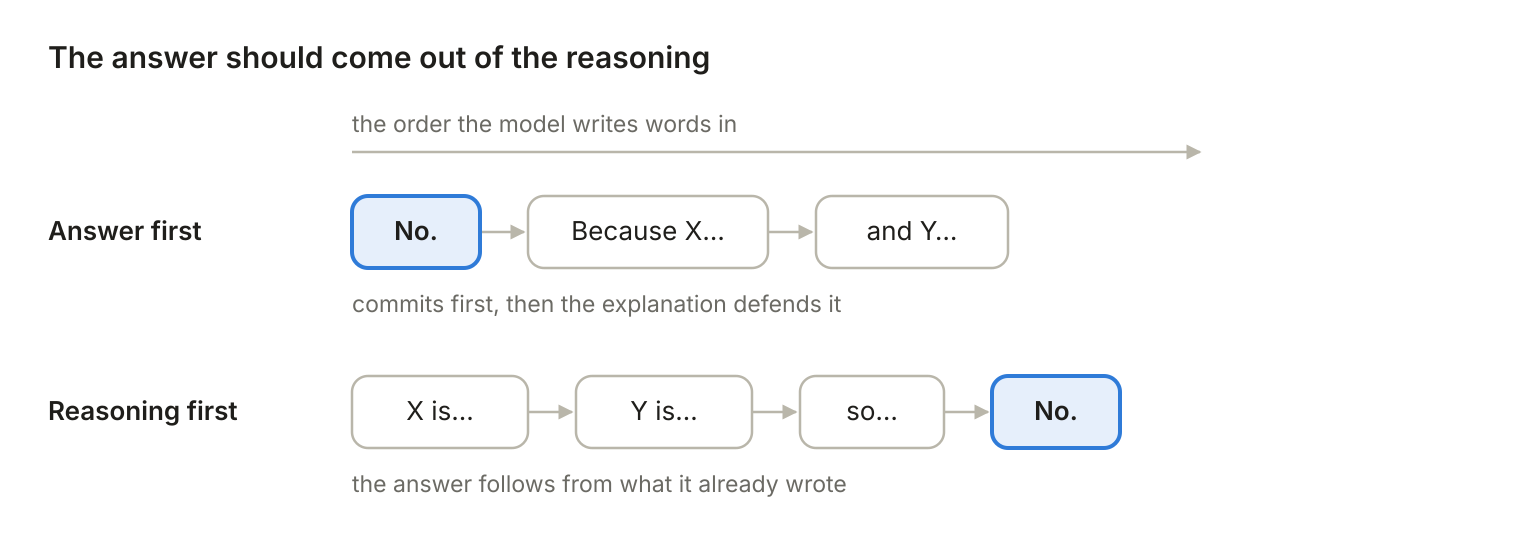
The model does most of its step-by-step thinking by writing words. So if it gives you the answer first and the explanation after, the explanation is often just a justification for an answer it had already committed to.
So ask it to think step by step and give the answer at the end. This is called chain-of-thought prompting. When I’m working through a complicated problem, I often ask it to “think from first principles,” which has the same effect. This is also why thinking modes help: the model writes out its reasoning before it writes the final answer.
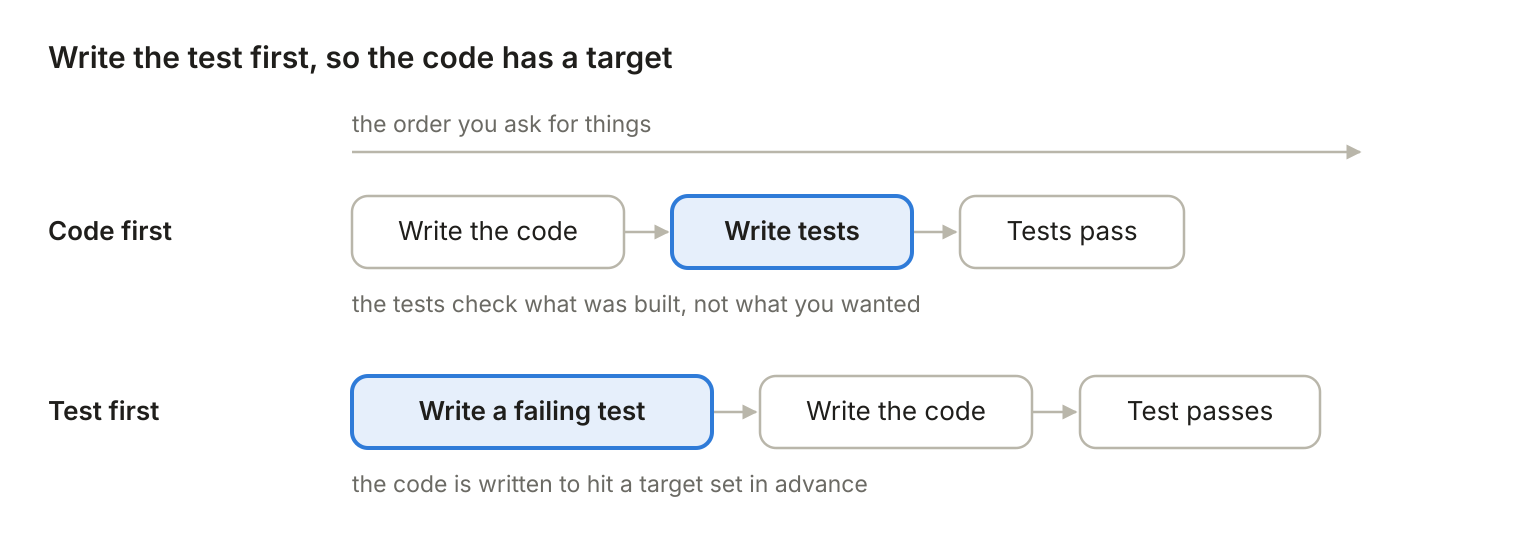
If you write code, the same idea applies. Ask for a failing test1 before the implementation. That way the test pins down what “done” means, and the code gets written to pass it. Do it the other way around and the model writes the code first, then writes tests that confirm whatever it happened to build.
Its own mistakes become input
Every word the model writes goes straight back into the context, including the wrong ones. So a bad answer early in a chat keeps steering everything that comes after it.
That’s why arguing with the model in the same chat often goes badly. You usually get further by starting a new chat.
Long chats get worse
Every turn adds to the context, so the longer a chat runs, the less focused the model gets. When you notice it drifting, start a new chat. You can also ask it for a short summary first and paste that into the new chat. Claude Code and similar tools can do this for you. It’s called compacting your context.
Starting fresh works even with memory turned on. Memory brings in a short summary, not the whole long chat it came from.
Fluent doesn’t mean correct
The model picks words that sound plausible, and nothing in the loop checks whether they’re true. So it sounds exactly as confident when it’s wrong as when it’s right, and that’s where made-up answers come from. Check anything that matters, or give it the data and have it run code, as I mentioned earlier.
Some tools, like Claude Code, also let you add automatic checks, called “hooks,” that run at set points, like after the model edits a file. That way some mistakes can get caught by code instead of you.
Leading questions get agreeable answers
The model continues your text, and that includes your opinion. Ask “Isn’t X better than Y?” and agreeing with you is the most likely continuation. Training on human feedback makes it worse, because people tend to rate agreement higher.
If you want an honest take, ask neutrally: “Compare X and Y.”
Show an example instead of describing it
The model is very good at continuing a pattern. So one sample of the output you want often works better than a whole paragraph describing it.
If an answer is bad, regenerate it
Because of the randomness, any single answer is just one of many the model could have given you, and not necessarily the best one. If a result is bad, regenerate it before you give up on the prompt. And for anything important, don’t trust a single run.
The short version
An LLM guesses the next word, over and over. So what you put in front of it, and in what order, decides what you get back. Next time you get a bad answer, look at what the model actually saw before you rewrite the prompt.
- A test is a small program that checks whether your code does what it should. It fails at first because the code it checks doesn’t exist yet. ↩︎