Table of Contents
All shared Google Photos are open to the public, even if they were only shared with specific people. This is different from Google Drive, where only people granted permission via the “Share with others” drop-down are able to view the content.
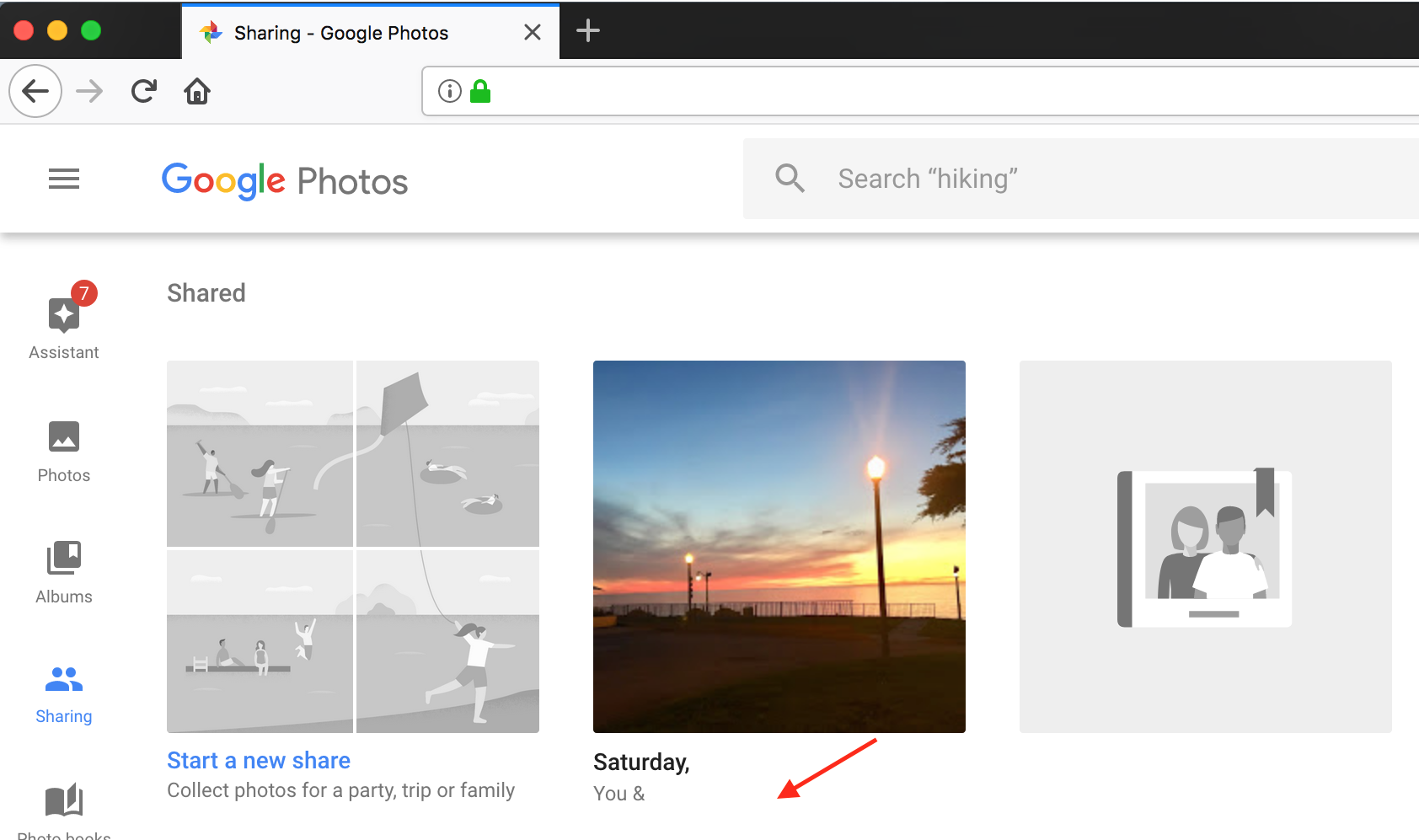
Below is a screenshot of my private album (that I shared with one person) open in Private Tab (Incognito Mode) in Firefox. I was not asked to login.
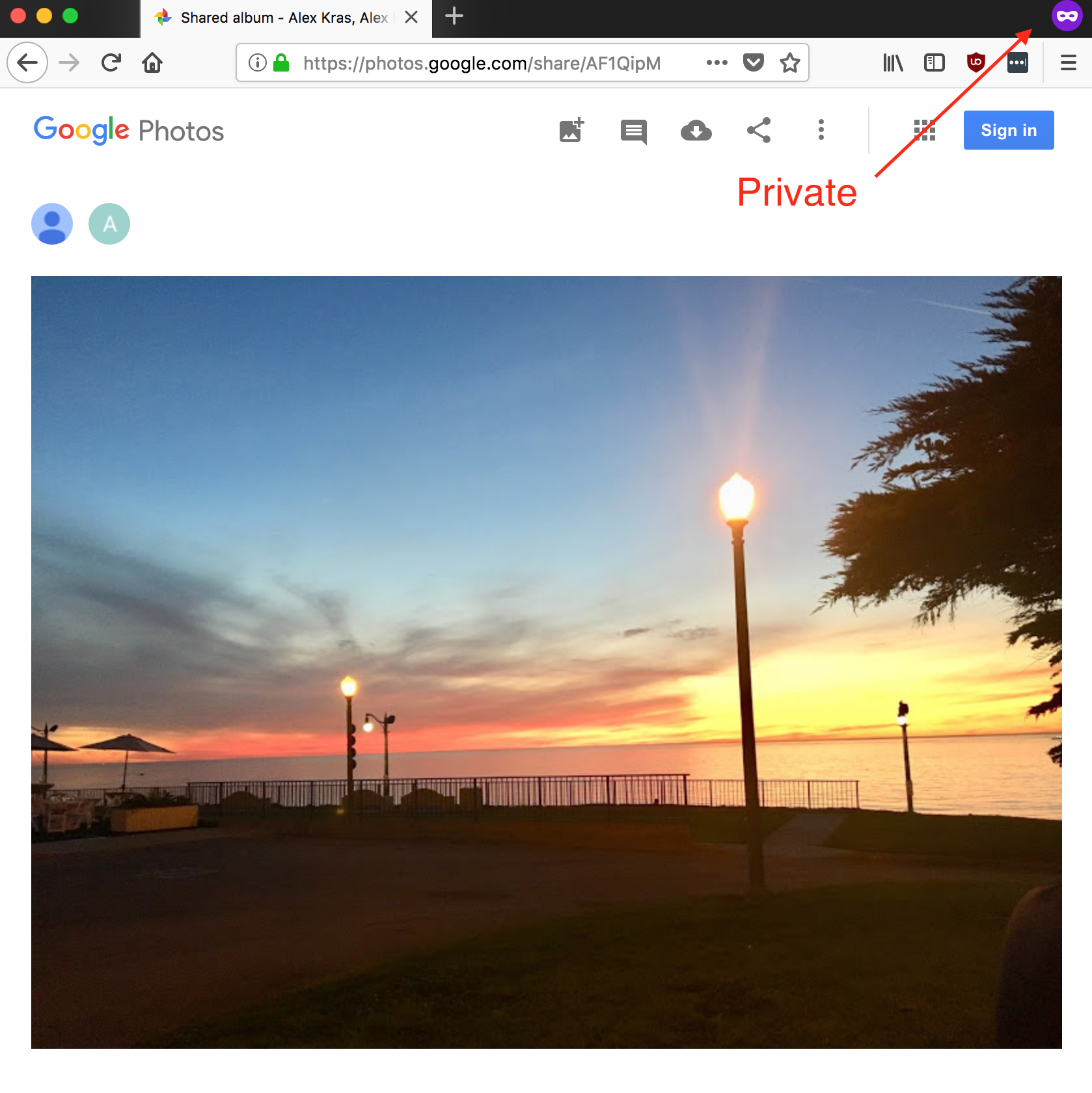
You can test it yourself by visiting this link.
Google Drive is Different
If I share the same image with the same person in Google Drive, I will have to sign in to prove my identity. If I sign in with a different account, I will get the following error:

You can test Google Drive behavior by visiting this link.
Backstory
This morning my mother asked me: “Can you make sure my Google Photos are not public?” I thought she was wrong (come on, mom) and that they were all private. I copied a link to a random photo and opened it in a Private Tab to investigate. To my horror, it loaded just fine…
Turns out EVERY photo shared in Google Photos becomes Public by default. The only security measure is that the photo or album link is hard to guess. The long link acts as a password. Sharing Google Photo album, is like sharing a password with other users. It should only be done with content that you would not mind being accessible to the public.
In comparison, when user email is specified in Google Drive, only logged-in users with matching emails will be able to access the data.
It was pointed out that this link is REALLY HARD to guess. It does not need to be guessed though. All it would take for some strangers to get access to my private photos, is for one of my relatives to share this link by mistake.
Google Photos is NOT Google Drive
I am a big fan of Google Drive and Google Photos. I got all my family members to switch to Google Photos to back up and organize their ever growing digital collections.
I never realized that the sharing behavior was so different between Google Drive and Google Photos.
Google Drive – What I Expected
In Google Driver there are two options to share:
- By email: ONLY people with this email will be able to view or edit the files
- Via Sharable Link: Anyone with a link will be able to view or edit the files
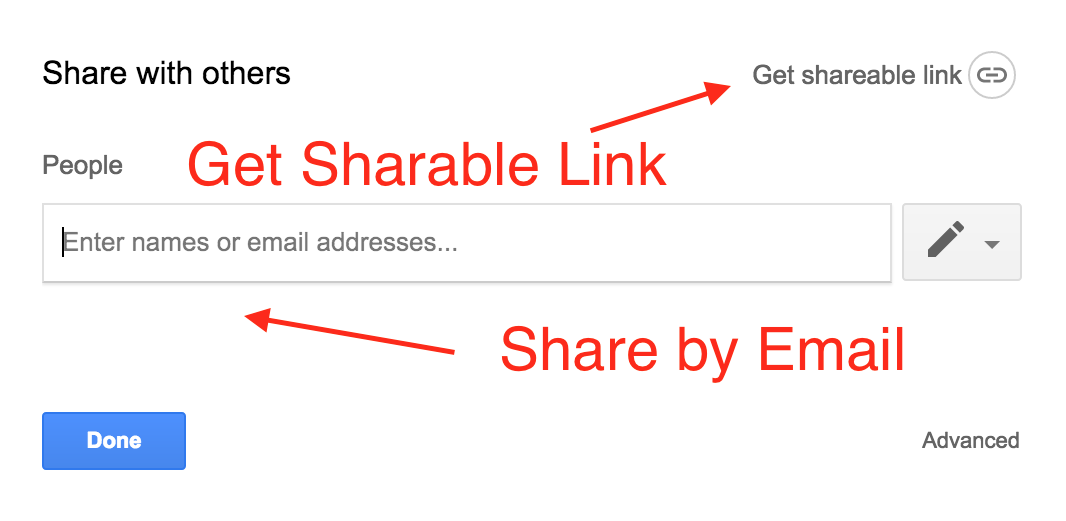
Note: This is a screenshot from Google Drive, Google Photos screenshot is in the next section.
As can be seen, these two options are clearly described in Google Drive. There are valid use cases for getting a sharable link. But if the email option is chosen, only users who are signed in to Google with their email will get access to the data.
Google Photos – Not What I Expected
Since Google Photos only had the email option, I assumed that the behavior will be similar to the email option in Google Drive. Here is a screenshot from Google Photos. Nothing in the UI indicated that a sharable link will be created.
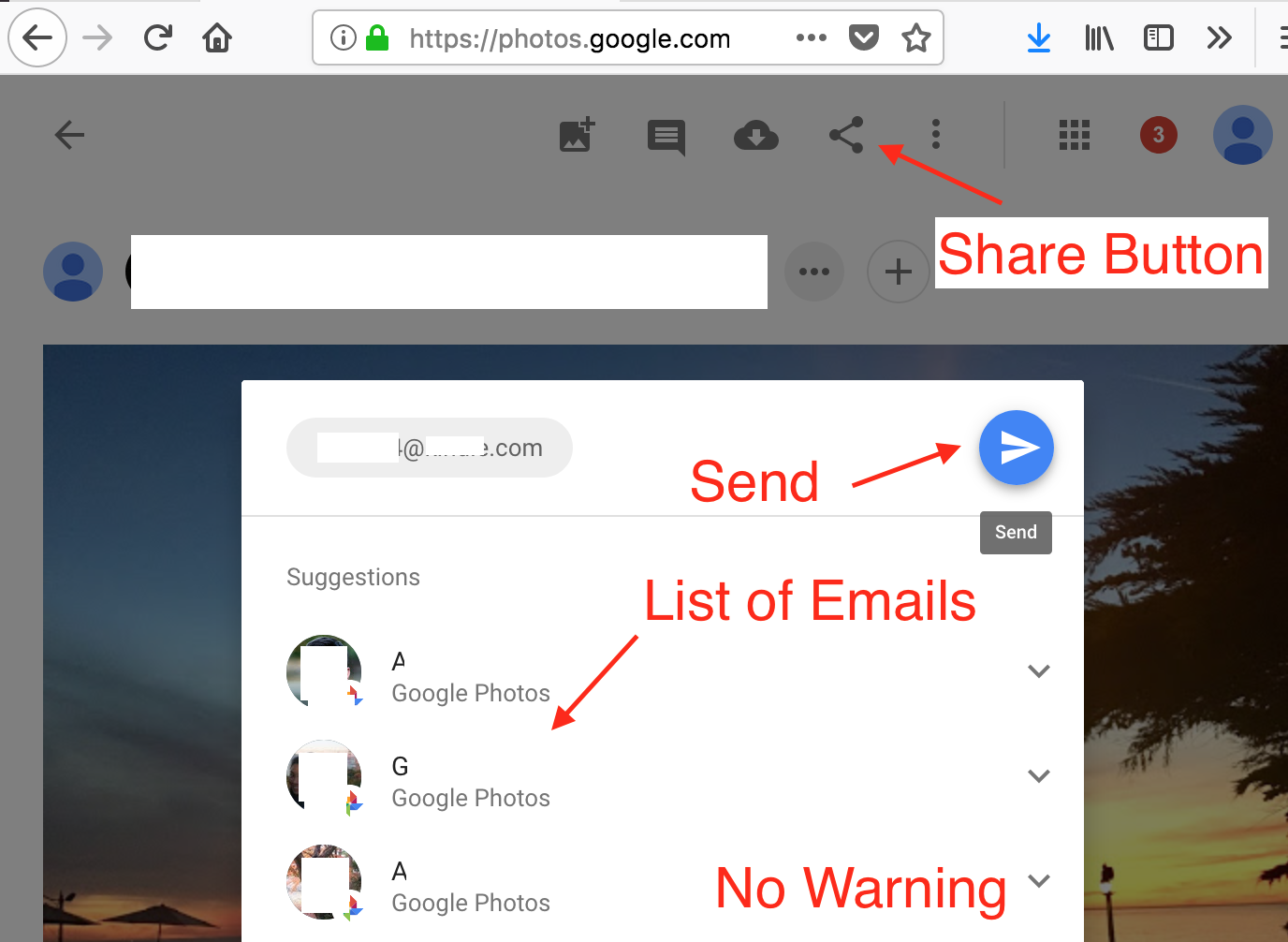
It looks like photos will only be shared with selected users.
Google Photos app on iPhone looks similar, but “create a link” button appears as a separate option. This led me to believe that I will get similar behavior to Google Drive.
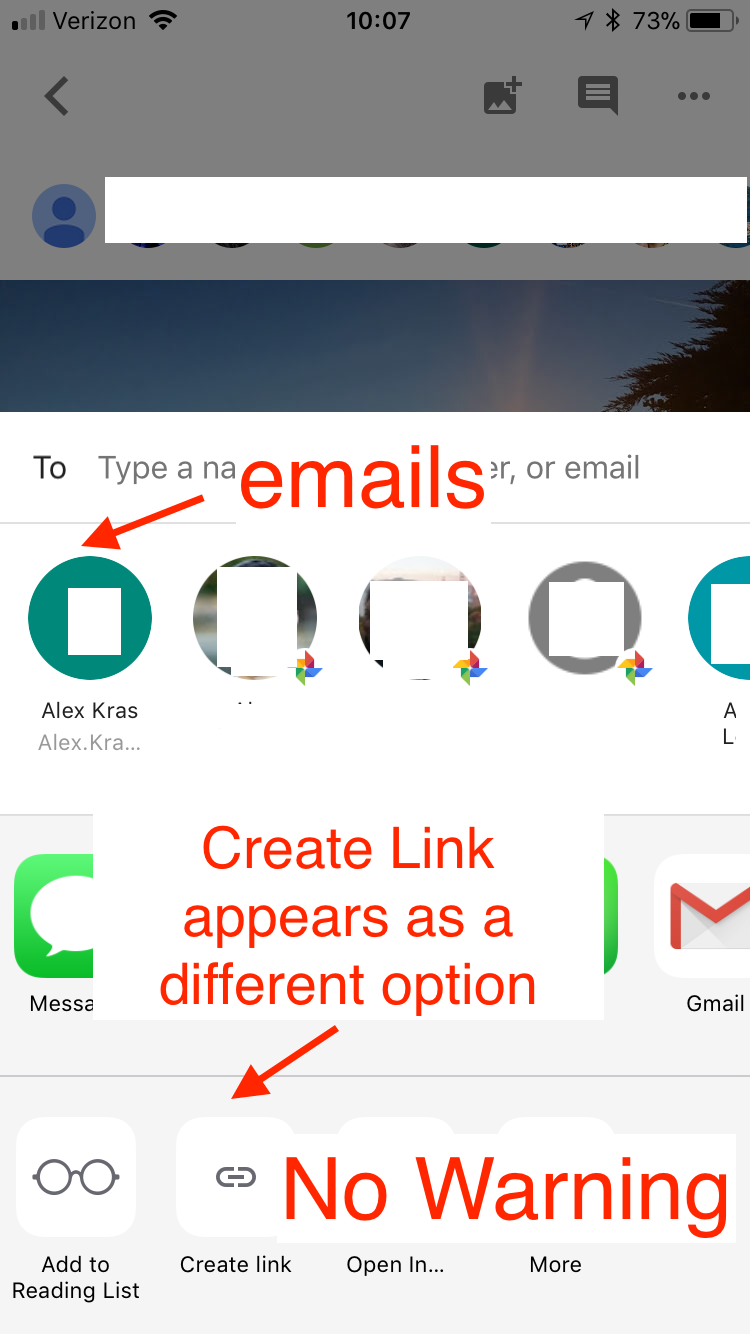
In reality what takes place is:
- Create an album if photo is not in an album yet.
- Create a sharable link for the album. Anyone with a link can view the photos.
- Email people whose emails was specified via share form, with a sharable link.
In other words, sharing an album on Google Photos, makes it accessible to anyone with a link. This is definitely NOT what I expected.
What to do next
First, I would like to raise awareness about this issue. I know some people might have very private photos stored on Google Photos (I do).
Second, I think that this is a lazy design. I hope that Google will address it. If you are not happy about it, please make sure to let Google know. I did not see any option to change this default behavior. If such option exists, please let me know in the comment area and I will update the post. So far, it looks like it’s a known “issue” that was there for at least one year.
Last but not least, I would encourage everyone who uses Google Photos to check their shared albums and to un-share anything that they would like to keep private.
To un-share an album:
- Navigate to Google Photos
- Select a “Sharing” tab on the left
- Open the shared album in a new browser tab
- Select “More Options” (3 vertical dots) menu
- Select “Sharing Options”
- Switch the “Share” toggle to OFF
- Repeat steps above for all public albums
I would suggest using Google Drive (or other 3rd party services) to privately share photos instead, until this issue is resolved.
Update 1: A user on Hacker News pointed out the following ( click here to read all comments):
All photos on Google Photos is publicly accessible, if you know the URL. It doesn’t matter if it’s shared or not.
This appears to be true and another key distinction between Google Drive and Google Photos. The article was updated to reflect this fact.
Google Photos uses direct link to image in their Web UI. This means that if I right-click on a Google Photo image, select “Copy Link Location”, and share this link on the Internet, anyone with the link will be able to see the photo.
I ran an experiment, by saving a URL last night and checking it this morning. Last night it worked in Private mode, but this morning the link has expired and prompted me to log in. So some good news there. The comment in Hacker News appears to be wrong.
Even if we assume that URLs will not expire, Google Drive adds an extra level of protection. The URL exposed in Google Drive Web UI is actually a redirect to the real image location. That redirect makes sure that the user is authenticated and has permissions to access the image. After the check is complete, however, Google Drive will redirect to the physical location of the image. Copying and pasting that URL will have similar security implications, until it expires.
That being said, given that those URLs are extremely hard to guess, I would not be as concerned with their expiration. My biggest complain with Google Photos is that it offers me a UI to email private links (think passwords) to other people, without alerting me about potential security risk.
Update 2: It was pointed out that there is a clear description of album sharing behavior when changing album sharing options.

It is accessible by clicking on the album and selecting the “Sharing Options” from “More Options” (3 vertical dots) menu. This message, however, is not visible when sharing via the “Sharing” tab in Google Photos nor in Google Photos app on iPhone.
Conclusion
My point is NOT that sharing by URL is bad, there are a lot of good use-cases for it. My point is that sharing by email looks very similar in Google Photos and Google Drive, but produces two completely different outcomes. The conflicting user experience probably caused a lot of people to feel a false sense of security, when sharing their private photos.
Not only are they not private/restricted only to those with whom you shared the folder, if they click the “Google Photos” icon in the upper left corner… voila! ALL photos… they have access to EVERYTHING. Essentially anyone with whom I have shared a folder or sent a link is logged in to my Google Photos. I thought surely I just failed to understand the process, but no, I was shocked and seriously disappointed. I have been uploading photos, organizing them into folders all with the anticipation of sharing certain things with certain people… NOT!!
Kim says “Sounds like you cribbing about not understanding a basic concept of sharing…. The share you are talking about is called “anyone with link can access.” Just don’t select it and delete your article.”
Read this article carefully – if you share with a specific person, even though the URL is hard to guess, the person you shared it with can forward that link with someone. In google photos sharing and link-shaing are the same thing. Google drives separates the two concepts.
Man… This exactly what happened to me… after weeks of uploading images to google photos and fixing their date and time in addition to organising them in albums (im talking about hundreds of gigas), i was shocked that sharing the albums is never private sharing even it looks like so,…. shame on google…
Thx for your article. I am a google drive user, too. So, I really expected that sharing with a people from my contact list share the album to their gmail accounts only (authorisation and authentication take place). How silly I was. Now I am looking for some other online cloud service that is user friendly like google photos but allows sharing only with authorised people. Any recommendation?
I haven’t found any, but I haven’t looked too hard. What I do when I want to share something, is get the file name, find it in Google Drive, and then share through there. This shares the same file but with Google Drive privacy guarantee.
I love how some of the initial reaction to this was “well, that is what sharing IS”. In order for that reaction to be valid, there needs to be OTHER, more private ways to share your photos – but there isn’t. You either share by link, or not at all. Still more infuriating is the fact that once you shared with a group of people, there is no way to remove the privilege from a subset of those people without turning sharing completely off and then starting over – to the annoyance of everyone else, because now the sharing process needs to happen again.
I think you did a fantastic job of calling attention to this VERY REAL usability problem. Too bad that even as of this comment’s writing, Google still did nothing to correct this problem.
hi ok so some time ago i shared some photos with a friend of mine through google photos. about a month later he informed me that his wife was able to access ALL of my google photos now somehow even the ones that i have recently taken on my phone and had not shared and WOULDNT share with anyone either. i didnt belive him and he sent me few of my recent pics that were quite embarrassing actually and they were sent to him as a screenshot from his wifes phone. so shortly thereafter he and i sat down and he was telling me about how he even has access to everything in my google drive as well. how the hell is this even possible\
This sounds like a different, bigger “bug” than what I described here. You should try contacting Google to make sure nothing else is going on.
Even if the user mistakenly shares something in a folder and thus making the whole containing folder accessible, not realizing what is shared, it is Google’s mistake of not making very clear what is shared and what is not! It actually makes it scary to share something because everything is not clear enough
I want to share an album privately with one person and without warning now everyone with the link can see?!?!?!?!
Someone should file a class action lawsuit
You state this has been the case for a year but actually the Google community discussion that you link to shows that it has been going on since at least 8/20/15. :/
Similar issues go further back then 2015, going back to when Picasa Web Albums was still in beta. I know this because I’m an old Google user (not old in age though). Google Photos is still far more better than Flickr and I’m grateful for what Google has accomplished. Google Photos creates collages, GIFs, panoramas and more with just a few clicks.
Sadly, I would personally love to see all our albums set to private to begin with then when they are set to public they could be presented on our own Google Photos profile, where it would look more like the albums section of Flickr, with all the albums listed and where people can view them as a profile. This is doable if they rework their coding correctly, although they have yet to reach this feat.
Google has acquired FeedBurner (Google FeedBurner), Blogger (Google Blogger), Picasa Web Albums (Google Photos), YouTube (Google YouTube), Keyhole Maps (Google Earth), and Deja Usenet (Google Groups, Google Groups Mail Service Client), Inbox (Google Mail Inbox) — all of these and more were acquired prior to Google Accounts becoming available. Even in 2007, Google Maps was still in beta and Google Drive was non-existent. Although, back then, Google Video Player was around, slightly better than Windows Media Player.
Some photo editing software that Google recently acquired was somewhat merged into Google Photos. Check out the Apps – Google from the top of the homepage of Google, which will take you to the products page with the list of available products, scroll to All Products to see the entire list.
Even though Google+ is no longer useable by consumers such as us, it does show the short goo.gl url in the short Google Photos album links.
I hope that everything I said has helped but to be honest, sharing your photos publicly is at your own discretion. Mine are stored on Google Photos and on my own website. Google Drive seems to have better security even from my own use but does tend to fill up storage space as photos count as a file and this fills up your storage steadily fast on Google Drive. Interestingly, photos stored on Google Photos, both via desktop computer browsers and the app, don’t take up any storage space at all. Maybe Google need to sort out their irony first before they decide to take the leap of faith.
I’ll get to playing some more video games and playing on my guitar and taking photos, as I do.
It would be effective if you linked your “let Google know” phrase to a page where we can do that.
Wow! Insane. I just found that out today. Horrible design!
I found your article helpful and clear. Along with your clarifications and corrections, it is valuable. I too had expected a similar behavior to that of Google Drive. I’m sorry that some commenters choose to harsh on you.
As of today, Jan 18.2019, I’m finding that turning off sharing for albums, and being sure it’s actually turned-off, using the web browser and Android app interfaces, is as clear as mud. Cutesy icons instead of clear explanations make it apocryphal at best, falling into the iStupid way of doing things. I’m still working on figuring it out.
Again, Thanks.
And then there is the “download all” option on shared google albums. That’s right, ANYONE can download all the images in a shared album – just look for it in the menu.
To be honest I do not know what is the solution for this as we are unable to remove the fake reviews. It’s so easy for the competitors to leave the fake reviews at your google business. Is there any way we can check/verify the user’s profile whether it is real or not?
Thank you for this! I don’t even want a chance of someone else seeing my photos, even if the link is impossibly long. Someone said they’ve seen other people’s private photo albums on here, but I need to be able to still share with close friends and family. The share/unshare option was brilliant!
Google Photos has an option in its settings to display any JPGs and PNGs and perhaps other lesser known graphics file formats stored in Google Drive. For God’s sake, do not enable this. Imagine you have a folder in Google Drive containing confidential scans such as documents. With this link between GD and GP enabled, now these scans are one step away from being publicly accessible. In fact, it is possible that all pictures stored in Google Photos by default already have corresponding unlisted but publicly accessible URLs. The act of explicitly sharing them simply asking Google to reveal these URLs. This is why I keep truly private photos and scans of documents in Google Drive.
I have same issue here on which ive been trying to figure out the problem to this n solving this problem.
My wife shared some private photos from google photos app onto my gmail acct,when email was received i opened email message n tapped to view photos only to view gray circles with a minus sign..Ive downloaded apps to change format of photos from png to jpg but still no images.Ive resend it ,copied link but keep saying album is empty.??
What happened to photos or whats the cause of this thats not allowing me to view photos??
I did a search in my Google Photos for an image, image didn’t show up and it said “want better results, help out” so I started this crowdsourcing image filtering where I was going through people’s photos and it became clear the images were not meant for the public and were private photos. That’s when I found out this alarming news – even if the link is unlisted Google can do what they want with your photos. So… This is not cool. So not cool.
Interesting. Could you possibly share some examples?
How did you crowdsource images??
Hi Alex,
I don’t usually comment on articles but your article has helped me see and understand the issue you have highlighted.
I just want to use Google photos safely and your article has given me a better understanding of how to do that.
Well done for writing it a non-jargon language I could understand too.
Thank You.
Someone may have already said this, but I stopped reading the replies because, man, some people are really rude.
Anyway, Google Drive still includes your photos in a folder called “Google Photos” sorted by year. So, I guess for now, if you wanted to share, you could go there to do it. I just tried it and it works as expected like the rest of Google Drive. I know it’s not the same or as user friendly as just sharing from Google Photos directly. But at least you don’t have to move the photos to Drive, since they’re essentially being saved in both places.
Of course if you’re sharing with something who doesn’t use Drive, then I guess it may be an issue for them, but…until this is fixed, it’s a workaround.
Thank you, I’ve been using exactly that, but like you said its not the same, for example there is no virtual folders organized by different categories, like you would get in Google photos.
Thank you for your article. I am trying to find a way to set up a team photo album for several parents/people to upload pictures of the team and players. In the past I have used a shutterfly account but am wanting to find an option where one does not have to be a member to upload pictures to the group. We will be using the pictures to put together an end of season slide show.
1. In checking this out, it appears that the Google Drive photos is not available anymore. I clicked on it and it’s directing me to Google Photos.
2. From what I can tell, I can’t set up a blank shared album. I just wanted to do this and email everyone the link.
3. I’ll have to investigate more to see whether or not this is what I want to use. I also want to make sure that if I set up a shared album on google that my other photos do not become public.
Again, thank you for sharing your findings.
P
Thank you for your very eye opening post!!
From what I experienced is that if you go to google photos and in case if you shared a photo or an album with someone it should appear under sharing tab. You then can remove the sharing priveleges for that photo or an album and that link will no longer show any picures. But by that time the other person might of saved the photo to their cellphone or computer. I don’t think photos have links assigned to them by default upon upload but only get random link created when you decide to share it with someone. That link stays the same until you decide not to share that photo any longer. In my opinion it’s a smart way of doing it and I wouldn’t worry about other people getting access to your photos.
Thank you! I didn’t notice that. I’m also a google drive user and i was sure that create a link works different than sharing to group of people. Main issue with this is that i share my albums to relatives only i cannot be sure do they share it further or no.
So the conclusion is sharing pictures in Google Photos is still considerably safe unless someone is deliberately trying to peek, although fundamentally it is not safe?
It’s safe, just know that if somebody somehow will get a hold of your shared folder URL they will be able to see everything there.
But…I mean….ummm….that clearly, very clearly, means it is not safe!!!’
It cant be that hard for Google to make it so that users can share with individuals, without having a creepy, public URL “that no one will know”, unless they somehow find it out… This is what all users think that they are getting, and Google is cheating them by letting them think that, without giving them that. Adding the minuscule note that it will be public is not a solution…
In addition to my other comment, I should add that I think it’s an excellent observation by the article author, and I appreciate his effort to share it.
Lol. The negative comments here are mind blowing. I totally understand what you’re trying to say, so thank you for saying it. People are reading too deep into your title and article.
Great article! I don’t even mind that this happens (I don’t share photos), but this was informative nonetheless.
Thank you!
Here’s an article about what it actually is and the facts:
https://www.theverge.com/platform/amp/2015/6/23/8830977/google-photos-security-public-url-privacy-protected
Thanks for the link. I reference the same link twice in the article.
This blogger is just plain stupid. Take away his Internets, please.
Feel free to say why you want about me, but i will not approve any bad comments towards other readers.
I have to commend you for taking the abuse of many of the assholes responding to you in stride. It’s really uncalled for.
As a developer, I’m familiar with how authenticated images served from remote cloud storage works, with an expiring URL, but the general public is not.
Similarly, I completely agree with your interpretation of the verbiage in the current UI. Since I’ve only ever shared photos with other Google accounts, I never thought I was creating a public, shareable link. As you said, both are useful, it just needs to be communicated.
Of course anytime you share a photo, even if it’s private, the recipient is free to save that image file and share it however they want. That isn’t the issue here, however. I’m much more concerned with accidental reshares by less technically knowledgeable users, or even compromised accounts. Google just needs to be more transparent, or ideally, give people the choice, just like they do for Drive.
In the meantime, you can link Google Photos to your Drive account. I wonder if that means you can share them from Drive using Drive’s authenticated sharing mechanism that requires a Google account. It’s less convenient, but worth a try.
Thank you, I really appreciate it!
I blame the negative comments on my inability to clearly explain my concerns. As a result I think only a subset of readers are able to relate.
What a terribly written article. Wow
Sorry I agree, not my best work, but felt like important information to share.
This is a terrible fluff piece. Of course one app acts different then another. Done with this blog.
Truly sorry to see you go, but I disagree. Google Photos is integrated into Google Drive as a separate tab (at least as of writing of this comment). This is what caused me to start using Google Photos instead of Google Drive to back up my photos in the first place. I don’t think my expectation of having a similar sharing behavior between the two was unreasonable.
He’s not the only one blocking this nonsense from his news feed. Later tater.
I found it very useful. You would expect google drive and google photo have similar behaviors because they are developed by the same campany with similar functions (at least for user’s point of view). I wonder if google did this on purpose since you have limilted capacity for using goolge drive (have to pay if over 15GB I think) but you have unlimited space on google photo.
“Paranoia runs deep”. The government is out there to get their grabby little hands on your dick pics. Geebus, you are a click bait, flesh version. I suspect that Apple users have comp-re-hen-sn problems.
The problem here is user is not actually understanding the technology that they’re using. This has always been true and it is no new news for people that actually understand. Do not share your photos via link if you do not want this Behavior.
And by the way this is advantageous that way not every user has to have a Gmail account to access shared photographs
There are some use cases for it, no doubt. I wish they would support 2 options properly, like they do in Google Drive. Share by link for public stuff, share by email (Gmail accounts only) for more personal stuff.
Says the guy that uses a photo of his kid in his public profile pic
I am not against sharing things. I am advocating for people knowing what they are sharing with whom.
not everyone’s #pizzagate-panicking…;-P
Do not share your photos via email in Google Photos if you don’t want this behavior. That is the point of this article.
Sensationalist headline much? Authentication keys are attached to randomly generated URLs. Yes anyone with the URL can view it without logging in. The odds of anyone randomly stumbling upon that URL and auth key together are astronomical without it being shared by you or whomever you shared with.
To the best of my knowledge Album share links do not expire. I’ve googled albums shared with more more than a year ago, and I was able to view them in Private tab.
Every photo is NOT accessible. If you do not “create a link” for a photo on google photo and you don’t share it, it will not be accessible to other people. When you “create a link”, it automatically shares the photo making it accessible to the public.
For individual photos you don’t have to create a link. You can just open the photo, right click, and copy image location. Give it a try.That is ok though, because those URLs are impossible to guess, unless you share them with someone.
I stand corrected, I saved a URL overnight, and it expired. So your comment was correct. I updated the post. My apologies.
Thanks. I didn’t know this at all. I will be sharing this info. Ignore the negative post. It’s the internet, if people don’t like the info they don’t have to read it. Thanks again.
Thank You! It means a lot!
I figured I wasn’t alone and wanted to let people know.
If you are THAT concerned over your privacy, you should a) not be sharing anything and b) not use online storage and c) go offline completely and stock up on MREs.
Or, for that matter, use your name and picture. You’re young, so hopefully there is a chance that you will learn. Or appreciate irony.
I would simply appreciate a warning, before sharing a video of my wife giving birth with the world.
If there’s not something you’d want others to see, don’t share. Send an email. And – sharing birth giving videos is just plain wrong. Who wants to see stretching snatches? A miracle my foot. You may want to ask your recipients if they’d be at all interested in your “precious moments” before you overshare.
Is what I’m reading real??!! Seriously! of course the people with the link will be able to see your photos its obvious its like giving a hard copy photo to some one and this person can show it everyone he or she want. And if you dont trust a people dont share with them, and if you changed your mind you can remove the link and will became useless. Or you can create album which is more restricted to only added people and you will be able to block whoever you dont want to see the album anymore. One more thing if login required that’s not convenient since everyone should have google account and google photos installed to be able to see the photos without browser.
I must be really bad at explaining this… You cannot create album that is shared with only some people. This is precisely the point of this post…
Bravo for this beautifully writtrn manifesto. I too was terrified, i mean up at night losing sleep, scared that my MOTHER saw ALL my PHOTOS terrified, last summer. Then i read the blurb about only the link is shared… however, this i assume may be a byproduct of it’s free usage as google drive requires me to pay monthly. Let’s band together for protection of privacy no matter the price!
Ironically I am a paid Google Drive subscriber, I only switched to photos because I assumed it provided same level of privacy, mainly due to convenience of the mobile app.
I am paying and would happily continue to pay for the privacy feature.
Please delete this fake news. Of course people that i am sharing albums are able to see my photos. If i dint trust them i wouldn’t share. Of course they can give the link to other persons but google cannot do anything for this. Even if they put some extra authentication it will be the same. People i am sharing still can download photos.
Google Drive has an authentication layer. I am glad you were not surprised by this. I was. I am sure I am not alone.
It became public since it was extracted from Google Plus as a separate product.
So never put there photos intended to be accessible for a private groups only.
You’re kidding right? The URL is clearly accessible by anyone and this has been in photos for a very long time.
Maybe you should read up on how URLs work before you start a blog
Have you used Google Drive? May be it’s because I came from Google Drive to Google Photos, but it was anything but clear to me that the email share would create a link accessible by anyone. I though that Google would authenticate the users, to make sure they were on the list of people that I added manually. That is how Google Drive works.
This is what it says when you share an album. Again, you’ve posted a rant about something because you didn’t read the instructions.
And your defense is that it doesn’t work like another product you use
The URLs can be shared so not everyone has to sign up to view it. It’s this way by design.
https://i.imgur.com/aVT3Iiw.png
Thanks for the image, I already figured it out by now and added an update to the bottom of the post.
As I pointed out in the update, this text is not available in two other flows that I used.
Sure it is my fault for not noticing it earlier, I take full responsibility.
Still, there must be other users out there like me who overlooked this description. This post is for them.
Sounds like you cribbing about not understanding a basic concept of sharing…. The share you are talking about is called “anyone with link can access.” Just don’t select it and delete your article.
You are the second person to say something like that. There is nothing in Google Photos UI that indicated the ““anyone with link can access” behavior.
Perhaps I confused you by placing the Google Drive screenshot first?
Yes, There is! Absolutely descriptive! Are you stupid? Or this is a idiots iPhone version? Buy an Android.
I am on iPhone. Is Android UI more descriptive? Would you mind sharing a screenshot of share option with a warning?
P.S. Or I could be stupid
nice reply #KillemWithKindness😂